Why We Built Our Own AI Code Sandbox
"We could give agents perfect context, but no place to actually run code."
We always wanted to build this.
ProdMap started as a context layer for humans, then became a context layer for AI agents. Give agents the right information about your codebase, your product, and your constraints, and they make better decisions.
We proved it works: deployed in large enterprise environments, including Fortune 50 teams, with agents that actually help instead of hallucinating. But there was always a gap.
We could tell an agent everything it needed to know about what to build and why. Then it generated code and that code went somewhere else: Cursor, Claude, or whichever IDE the developer happened to use.
We kept saying, "we should just give agents a place to run code." Then another enterprise feature request would land, and we would push sandboxing out another quarter.
Then I saw Ramp's post about their internal coding sandbox.

The Idea: Parallel AI Agents With Shared Context
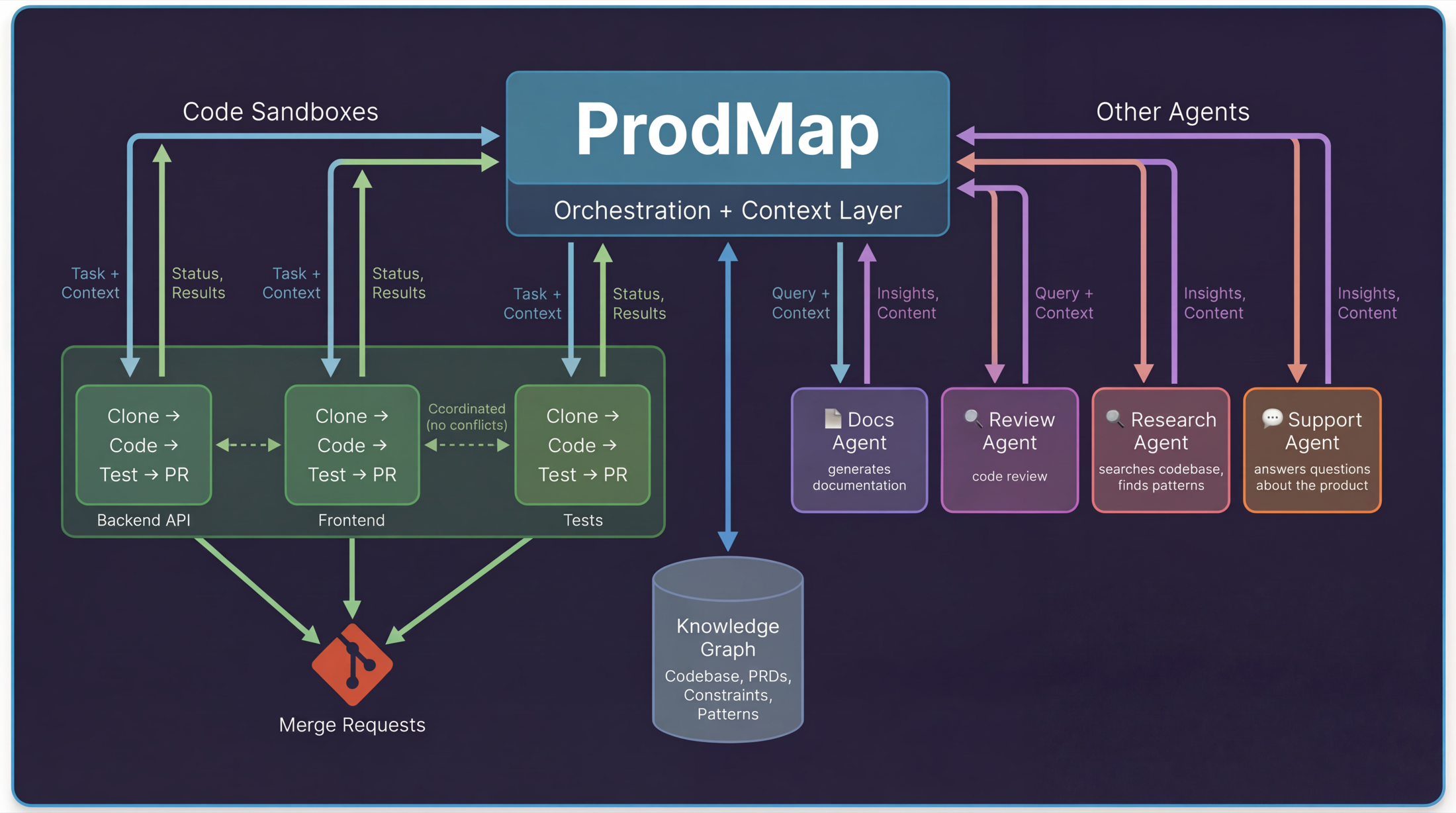
The picture we had in mind was simple: you describe what you want to build in ProdMap. ProdMap already knows your codebase, product context, active workstreams, and constraints. It breaks work into tasks, spins up sandboxes, and agents start coding in parallel.
Each sandbox reports back. Tests pass, code gets pushed. Tests fail, ProdMap figures out why and retries or escalates. Multiple agents coordinate through ProdMap so they do not step on each other.
Not one agent in one IDE with one developer watching. Dozens of agents across your codebase, orchestrated with the right context, actually shipping code.
The only prerequisite I had was that it should be written by the Claude + ProdMap combo, with me watching over.
Step 0: Choosing a Cloud AI Code Sandbox Provider
We chose Modal because it nails the three things that matter most for a cloud AI code sandbox: speed, concurrency, and simplicity.
Their docs around cold start performance and container warmup tradeoffs mapped closely to what we needed in production.
- Cold starts in under a second, so users do not wait on infrastructure.
- Each session gets a dedicated container keyed by `session_id` with full filesystem isolation.
- `scaledown_window` keeps containers warm between interactions, so follow-up requests reuse the same workspace instantly (reference).
The biggest win was setup: container image, secrets, volumes, scaling rules, and warm pools all in one Python file. No Dockerfiles, no Kubernetes, no Terraform. We decorated a class with `@app.cls(cpu=4, memory=8192)`, ran `modal deploy`, and had production containers with persistent volumes and streaming endpoints in minutes.
Step 1: Getting the Sandbox Running Reliably
The first problems showed up immediately. We have five repos, and the initial Modal setup script tried to do everything in one shot: start a container, clone all repos, install all dependencies, and build everything.
It kept timing out.
The fix was to split setup into smaller autonomous scripts: clone this repo, install these dependencies, run this build. Small units could fail and retry independently.
That pattern came up over and over. Every time we tried to do too much in one shot, it broke. Every time we split work into small autonomous steps, it worked.
Step 2: Making the AI Code Sandbox Fast
Our first version copied cached repos directly from Modal Volumes. A typical React project has 40,000 to 60,000 files in `node_modules`. Volumes add per-file network overhead, so restore time ballooned to 60 to 90 seconds.
We tried parallel copy, selective restore, and symlinks. Nothing moved much because the root issue was too many small files.
The fix was obvious in hindsight: store caches as tar archives. One 200MB read is dramatically faster than 50,000 tiny reads.
| Operation | Before | After |
|---|---|---|
| Restore repo | 30-45 seconds | 2-3 seconds |
| Restore `node_modules` | 60-90 seconds | 6-8 seconds |
| Total | 90-135 seconds | 8-11 seconds |
The restore flow now has three cache tiers:
- Tar exists: extract it (fast path).
- No tar, raw dir exists: tar it, save it, then extract (medium path that prepares future fast runs).
- No cache: clone or install from scratch, then create tar (slow path, usually once).
Cache invalidation is content-hash based: repo cache key = `sha256(repo_url + branch)`, dependency cache key = `sha256(repo_hash + lockfile_content)`. A code push invalidates repo cache but can reuse dependency cache. Lockfile changes invalidate both.
Step 3: Finding the Right Agent Runtime Mode
We started with OpenCode. First attempt was one-run mode, which is clean for CI but wrong for an iterative coding loop where test failures need follow-up fixes in the same live context. OpenCode's server documentation made the API-driven mode much easier to operationalize.
result = subprocess.run(
    ["opencode", "run", task],
    capture_output=True,
    timeout=300,
)
One-run mode exits after a pass. If tests fail, you restart and lose conversational continuity. We then tested CLI capture, but terminal output brought ANSI noise and poor structure for product UI.
The breakthrough was server mode with HTTP + SSE:
server = subprocess.Popen(
    ["opencode", "serve", "--port", "3000", "--cwd", "/workspace"],
    env={**os.environ, "ANTHROPIC_API_KEY": anthropic_key},
)

chat = await client.post(
    "http://localhost:3000/api/chat",
    json={"message": task},
)

async with client.stream(
    "POST",
    "http://localhost:3000/api/chat/stream",
    json={"message": follow_up_task},
) as stream:
    ...
Now we had structured events, progressive streaming, and proper follow-up calls in the same session. That is the mode we needed for a production agentic coding workflow.
Step 4: What Works in Production Today
You give ProdMap a task. ProdMap spins up a sandbox with the right repo and context. The agent reads code, generates code, runs tests, and retries on failures. When tests pass, it commits and opens a merge request.
The current flow:
- Task enters ProdMap with PRD, constraints, and relevant code patterns.
- Sandbox starts in 8-11 seconds when cache is warm.
- Agent runs the write-test-fix loop until tests pass or escalation is required.
- Passing changes are committed, pushed, and surfaced as an MR for review.
For straightforward tasks like "add this endpoint," "fix this bug," or "write tests for this module," this now works end to end without manual intervention.
Step 5: Reliability Engineering in an AI Code Sandbox
The obvious part of an AI code sandbox is execution. The hard part is reliability under interruption.
In production, users cancel generations, refresh pages, lose sockets, and retry. If cancellation only kills a process, trust breaks immediately. So we treat cancellation as a first-class flow: lock the session, infer output type, cancel active tasks, build a completed vs skipped receipt, and emit finish exactly once.
For text outputs, we preserve safe partial content with a clear marker. For structured outputs, we intentionally avoid showing broken partial payloads and return a canceled state instead.
Step 6: Parallel AI Agents Need Dependency-Aware Planning
"Parallel agents" without planning creates conflicts. We plan first, then execute.
ProdMap turns the request into a dependency graph, topologically sorts it, and executes independent groups in parallel while dependent nodes wait. Every plan item streams lifecycle states (`pending`, `in_progress`, `completed`, `skipped`, `failed`), so users can see what is blocked vs progressing.
That is the difference between a coding assistant demo and a system that can coordinate parallel AI agents across a real codebase.
Step 7: Stateless Containers, Stateful Sessions
Containers restart. That is normal in cloud infrastructure, so continuity cannot depend on a single long-lived process.
We store session metadata by `session_id`, auto-reconfigure sandbox containers when recreated, restore workspaces from cache, and continue execution with the right context. On the streaming side, we send keepalives and standardized events so long tasks do not look dead in the UI.
Step 8: From Code Generation to Merge Request
"Files changed" is not delivery. "Merge request ready for review" is delivery.
We added sandbox helpers for branch creation, push, and MR creation, so the loop ends with a reviewable artifact in your normal engineering workflow.
We also support checkpoint and restore semantics so long-running tasks can safely recover after interruption.
Step 9: Retries as a Product Feature
LLM providers get overloaded. DB connections fail. Networks stall. Instead of hiding this, we surface retry behavior and backoff in progress logs.
That transparency changes user trust: people can see when the system is recovering automatically and when human escalation is needed.
What's Next for Our Agentic Coding Workflow
- In-sandbox visibility: browser and IDE access, not only chat-level visibility.
- Multi-sandbox orchestration: enforce non-overlapping ownership across parallel sessions.
- Customer onboarding: self-serve repo connection, credentials, and branch safety policies.
- Smarter planning and retries: Ralph loops at the orchestration layer.
If you are new to our approach, this post pairs well with The Context Gap and our planning workflow overview.
FAQ: Building an AI Code Sandbox
What is an AI code sandbox?
It is an isolated runtime where coding agents can clone repositories, run tools, execute tests, and produce reviewable changes without touching local developer environments.
How do you prevent agents from stepping on each other?
We plan with dependency graphs and execute only independent nodes in parallel. Related tasks share orchestration context but respect execution boundaries.
How do you keep sandbox startup fast?
We rely on deterministic cache keys and tar-based restores for repo and dependency artifacts, which avoids expensive per-file volume overhead.
Related Articles
Writing PRDs for AI Agents: The New Engineering Standard
Traditional PRDs are written for humans to interpret. AI agents don't interpret; they execute. Learn how to write specs that are deterministic and agent-ready.
The 'Context Gap': Why AI Coding Assistants Aren't Enough for the Enterprise
AI coding assistants are brilliant at syntax, but blind to context. In enterprise development, code is cheap. Context is expensive.
Top AI Prototyping Tools in 2025
A curated list of the best AI-powered prototyping tools that are changing how we design software in 2025. From text-to-UI to autonomous wireframing.
Continue to Product Pages
Turn this strategy into execution with the product and pricing workflows.
Thanks for reading.